Chrome deletes the downloaded APK file immediately. What should I do?

You tap the download button, the file appears in Chrome for a second, and then it is simply gone. No warning, no explanation, and nothing in your Downloads folder. If that sounds familiar, you have met Chrome's "Enhanced protection" mode, and the good news is that it takes about 30 seconds to fix.
Chrome has a feature called Safe Browsing. In the "Enhanced protection" mode it does not just check downloads against a list of known threats - it scans every file in real time with an AI model and sends data about your download to Google for analysis.
That model does not know AllTracker. What it sees is an app installed from outside the Play Store that asks for device administrator rights, accessibility services and location access. Taken together, those permissions look like the general shape of a tracking app, so the model plays it safe and blocks the file before you can open it.
In other words: this is a guess based on a pattern, not a verdict. AllTracker Anti-Theft and System Security are not detected by name, contain no malicious code and are not on any threat list. The file that was deleted is exactly the same file all of our users run every day.
Switching to "Standard protection" does not leave you unprotected. Chrome still blocks sites, downloads and extensions that are actually known to be dangerous. It simply stops making assumptions about files it has never seen before.
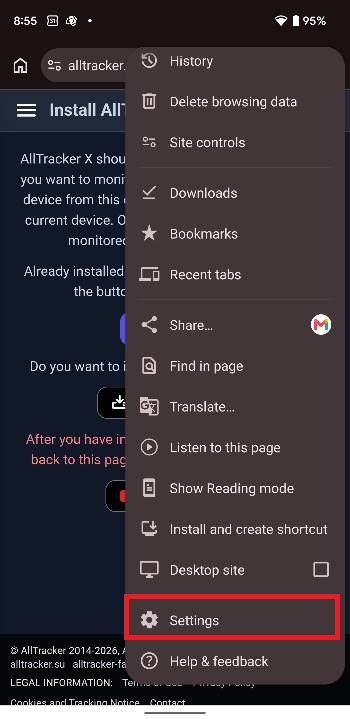
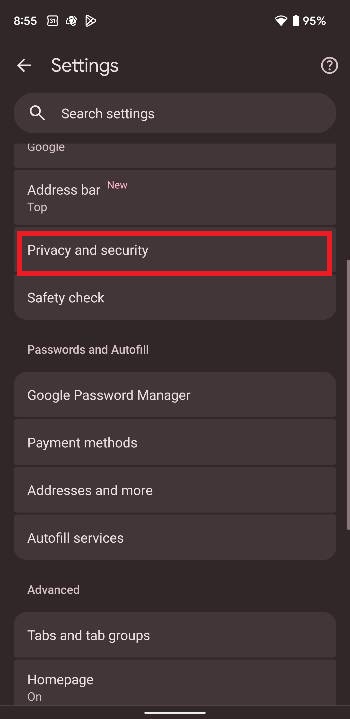
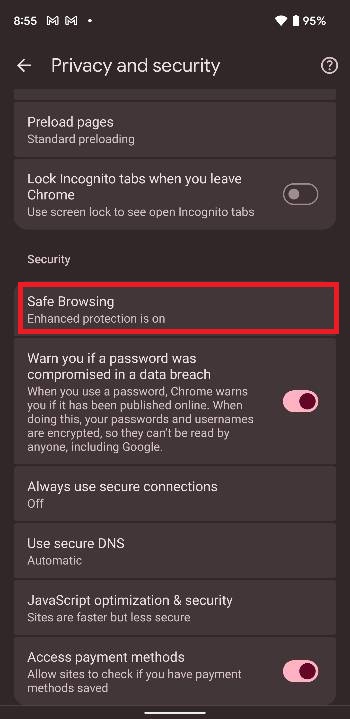
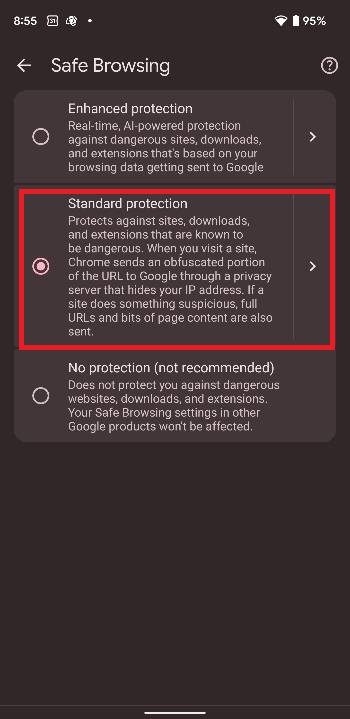
Go back to the download page and download the app again. This time the file will stay in your Downloads folder and you can install it as usual.
Once the app is installed, you are free to turn "Enhanced protection" back on if you prefer it. It only interferes with the download itself.
If the file downloads fine but the app is removed after installation, that is a different guard called Play Protect. We explain how to handle it here: "Play Protect" prevents the app from being installed .